Procedural City Generation
Overview

The Procedural City Generation module is responsible for generating realistic city layouts from simple input specifications. This module provides a flexible and extensible framework for creating diverse urban environments that can be used for various embodied AI tasks.
As illustrated in the figure above, the city generation process is organized into three sequential stages: road generation, building generation and street element generation. Each stage progressively adds layers of realism and complexity to the simulated environment.
Road Generation: The process begins with the creation of a road network, which serves as the backbone of the city. Roads are generated through an initiation phase and a tree-like growth process that balances depth and branching using a priority queue. Mechanisms such as road-end attachment and intersection checking ensure a coherent and plausible layout.
Building Generation: Once roads are established, buildings are procedurally placed along road segments. For each side of the road, candidate positions are sampled while checking for space availability and avoiding collisions. A greedy strategy is used to fill remaining gaps near road ends, maximizing spatial utilization and maintaining visual uniformity.
Street Element Generation: Smaller environmental elements such as trees, road cones, benches, and parked vehicles are generated around buildings and alongside roads. These elements are categorized and placed based on contextual zones—either surrounding buildings or within designated sidewalk areas. While collisions with other objects are not strictly enforced for performance reasons, the placement respects basic accessibility constraints.
Procedural Generation Process
Procedural generation is a fundamental technique for creating city layouts. In this approach, all items in the generated world follow predefined rules and constraints. These constraints govern the spatial distribution of elements, ensuring the resulting layout is structured and coherent rather than arbitrary.
Related files: city_generator.py.
Road Generation
Road generation consists of two sub-stages: initiation and road-tree growth.
Initiation. In this stage, the system reads the configuration file, focusing on road length and the number of initial roads. It then spawns the first one or two roads, each with a constant length (as specified in the config) and aligned at a 0-degree angle to the x-axis.
Road-Tree growth. Starting from the initial road(s), new roads are generated in a branching, tree-like manner.

To balance depth and branch density in the road network, we use a Priority Queue instead of simple DFS or BFS algorithms. The Priority Queue (implemented as a tree structure) selects optimal nodes for growth, resulting in more realistic urban layouts with balanced coverage.
Two special cases are handled during generation:
Road End Attachment. When a new road endpoint is close to an existing node, a visible gap may appear. To avoid this, we attach the new node to the nearby existing node, eliminating the gap and introducing greater road length diversity.

Intersection check. Even with the attachment mechanism, intersecting roads can occur. We perform collision checks during generation and discard any road that causes an intersection.
Related files: road_generator.py, road_manager.py.
Building Generation
Buildings are generated based on the road network. For each road segment, buildings are placed along both sides. The generation process for each side consists of two phases: normal generation and final building placement. The aim is to achieve uniform distribution and maximize space utilization.
Normal generation. A pointer tracks the current candidate position for placing buildings. It moves along the road, updating based on building size and road angle. The logic is as follows:
pointer_position = road_start * side * offset + margin_distance
while pointer_position < road_end * side * offset - margin_distance:
   pointer_position += building_size * angle
In each iteration, a building type is randomly selected from a building database. We check whether it can be placed without overlapping with roads or existing buildings.
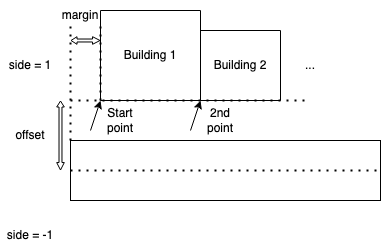
Final Building Placement. Near the end of a road, standard-sized buildings may no longer fit. To fill the remaining space efficiently, we greedily try building types from largest to smallest until one fits. If no building fits, we move on to the opposite side or to the next road segment.
Related files: building_generator.py, building_manager.py.
Street Element Generation
Street elements include smaller city objects such as trees, cones, chairs, tables, and scooters. These are distributed throughout the city to enhance visual richness. We use two strategies for generating them: around buildings and along roads. For performance, we check only for accessibility (not collisions), which balances realism with efficiency.
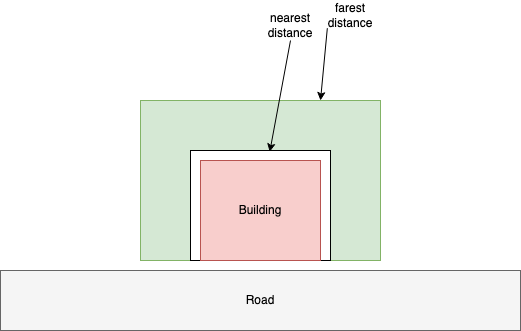
Elements surround building. For each building, we sample a fixed number of positions within a designated zone, excluding the side facing the road. Positions that fall on roads or inside buildings are discarded.
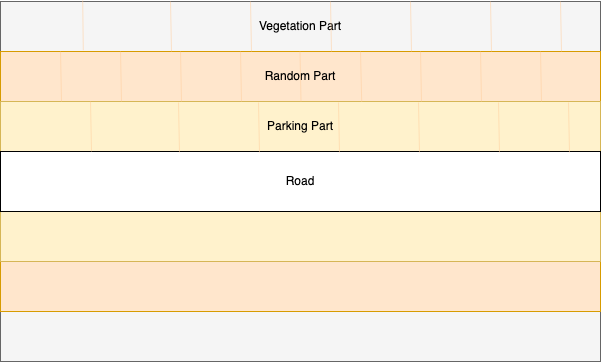
Elements spline road. Sidewalk areas are divided into functional zones such as vegetation, miscellaneous objects, and parking. Each zone has distinct item types and densities, offering better control over sidewalk appearance. Zones are defined by distance from the road’s centerline.
Related files: element_generator.py, element_manager.py.
Using Procedural City Generation
The CityFunctionCall class provides a simplified interface for generating city layouts programmatically.
Random City Generation
To generate a city layout randomly:
cfc = CityFunctionCall(config, num_roads, enable_element_generation)
cfc.generate_city()
cfc.export_city('path/to/your_folder')
This will automatically generate roads, buildings, and optional street elements based on the configuration.
Manual Road Specification
For finer control over city structure, you can manually add roads and then generate buildings and street elements:
cfc = CityFunctionCall(config)

# Add roads manually
cfc.add_road([0, 0], [200, 0])
cfc.add_road([200, 0], [200, 200])
cfc.add_road([200, 200], [400, 200])
cfc.add_road([0, 0], [-200, 0])
cfc.add_road([-200, 0], [-200, 200])
cfc.add_road([0, 0], [0, -200])

cfc.generate_building_alone_roads()
cfc.generate_element_alone_roads()
cfc.export_city('path/to/your_folder')
A complete example can be found in examples/layout_generation.ipynb.
Note
Procedural City Generation only produces JSON files representing the city’s structure.
To render the physical city in Unreal Engine (UE), see the UnrealCV+ documentation.