Traffic System
Overview
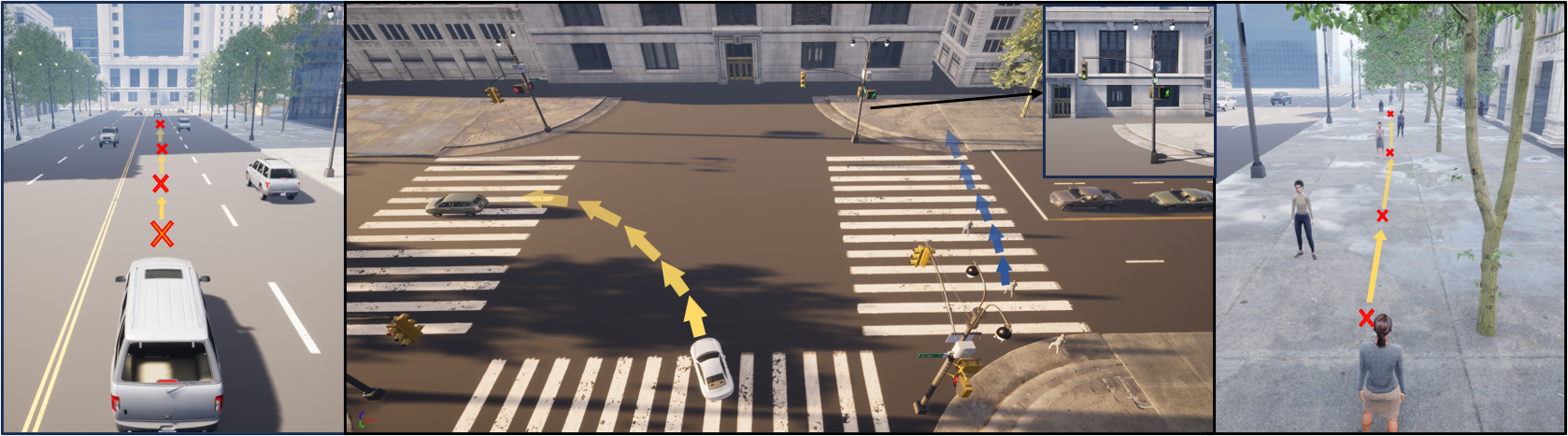
The Traffic System is responsible for simulating dynamic road usage by both vehicles and pedestrians. It enables the representation of realistic traffic flow, including vehicle generation, path planning, intersection control, and pedestrian behavior. By managing road interactions and traffic signals, this system supports complex urban scenarios such as congestion, pedestrian crossings, and traffic light coordination, providing a critical foundation for simulating realistic urban scenarios.
Architecture
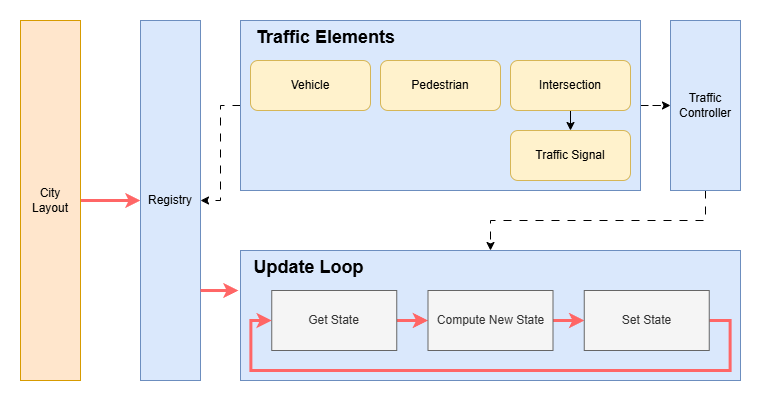
The diagram above illustrates the internal architecture of the Traffic System. The corresponding Python implementation can be found in simworld/traffic. The system is initialized using a city layout generated by the Procedural City Generation pipeline. Based on this layout, traffic elements—including vehicles, pedestrians, and traffic signals—are sampled and registered into the simulation.
A central component, the Traffic Controller, manages the simulation process. Once the simulation starts, it runs in an endless three-stage loop to continuously update all traffic elements:
Get State: Retrieve the current physical state of each element, including the location and orientation of vehicles and pedestrians, as well as the current status of traffic signals (red, yellow, green).
Compute New State: Using the retrieved states, the Traffic Controller computes the next action for each element—such as throttle, brake, and steering for vehicles; movement decisions for pedestrians; and signal transitions for traffic lights.
Set State: Apply the computed actions to update the state of each element within the simulation.
Important Class
Traffic Controller
This module serves as the central controller for traffic simulation. It manages the initialization, spawning, and coordination of all traffic elements, including vehicles (via the Vehicle Manager), pedestrians (via the Pedestrian Manager), and traffic signals (via the Intersection Manager).
Related files: traffic_controller.py.
Vehicle Manager
This module is responsible for the creation, spawning, and state updates of vehicles in the simulation. It manages vehicle lifecycles, movement logic, and interactions with traffic signals. A PID control algorithm is used to simulate vehicle movement. At intersections, each vehicle randomly selects a new outgoing lane.
Related files: vehicle_manager.py.
Pedestrian Manager
This module manages the creation, spawning, and updates of pedestrians in the simulation. It handles pedestrian lifecycles, movement behavior, and interactions with traffic signals. Pedestrians move directly toward their next waypoint and adjust their orientation when deviating. At intersections, each pedestrian randomly selects a new sidewalk to continue walking.
Related files: pedestrian_manager.py.
Intersection Manager
This module handles the creation, spawning, and updates of traffic signals, as well as vehicle and pedestrian routing through intersections. Currently, the system alternates vehicle signals turn-by-turn at each intersection. After a vehicle phase, all pedestrian signals turn green simultaneously.
Related files: intersection_manager.py.
Using Traffic System
To enable traffic simulation (assuming a city layout is already available), begin by instantiating a Traffic Controller:
traffic_controller = TrafficController(config, num_vehicles, num_pedestrians, layout_file, seed, dt)
Next, establish a connection to Unreal Engine (UE) and spawn all necessary elements within the UE environment. For detailed usage, refer to the UnrealCV+.
Once all prerequisites are satisfied, start the simulation with:
traffic_controller.simulation(physical_update_function, exit_event)
physical_update_function: Get physical state in UE.exit_event: Used in multi-thread environment.
A complete example can be found in examples/traffic_simulation.ipynb.
Note
Currently the Traffic System only runs in asynchronous mode.